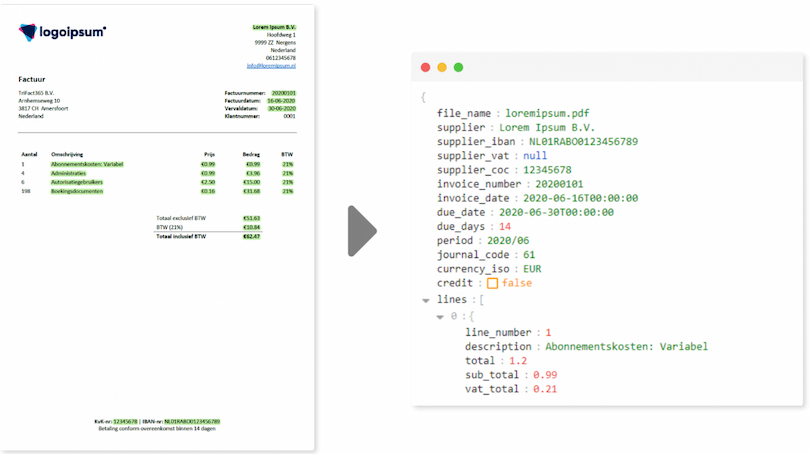
Invoice OCR software reads invoices and receipts automatically using optical character recognition, so nobody has to retype the data. OCR delivers the text; a second layer decides what that text means. This article covers what OCR is, how it works, how the process runs for invoices, where it breaks down, and why sending an invoice straight to an AI model sounds appealing but works out differently in a ledger.
The misunderstanding that explains almost everything: people expect OCR to understand the invoice. It does not. OCR reads characters and returns text, nothing more. That 1,210 is the total rather than the subtotal, that the party top left is the supplier rather than the recipient, and that these costs belong to a particular ledger account: all three are interpretations, and they come from somewhere else. Hold on to that separation and the rest of this article follows naturally.
Looking for something specific? For the process itself, go to scanning invoices with OCR. For the limits, see where OCR recognition fails. If you are wondering why you cannot simply hand the invoice to an AI, skip to that question. And for the product side, see invoice recognition software.
Contents
- What is OCR?
- How does OCR software work?
- Where does OCR recognition fail?
- Invoice capture, data extraction and OCR: what is what?
- How does OCR invoice processing work?
- Scanning invoices with OCR: the process
- What does invoice OCR software deliver?
- Choosing invoice OCR software: what to check
- OCR and bookkeeping: what changes?
- What happens to an OCR invoice after reading?
- Can you not send the invoice straight to an AI?
- Why TriFact365 uses two layers
- Three persistent misconceptions
- Frequently asked questions about invoice OCR software
- In closing
What is OCR?
OCR stands for Optical Character Recognition. It is software that recognises characters, meaning letters, digits and punctuation, in an image and converts them into digital text. That turns a scan, a photo or a PDF into a file you can search and that other software can process. The technique has been around for decades and now forms the foundation under invoice recognition software.
What OCR is not: understanding. The output is plain text with coordinates, not a booking proposal. That distinction recurs throughout this article, because it explains why a second layer is always required on top.
How does OCR software work?
Under the bonnet, OCR runs in four steps. A detailed technical explanation is available on Wikipedia.
1. Pre-processing
The image is straightened, noise is removed and contrast is pushed towards black and white. A skewed scan or a shadow across the receipt is largely ironed out here. This step often decides whether the rest succeeds.
2. Segmentation
The software divides the page into blocks, lines, words and individual characters. On an invoice with tables that have no ruled lines, this is the hardest part: where does one column end and the next begin?
3. Character recognition
Each character is classified, these days with neural networks rather than fixed pattern matching. The software assigns a confidence score per character, and that score matters later: it shows where recognition hesitated.
4. Post-processing
Dictionaries and validation rules correct the classic confusions: an 8 that looked like a B, a 0 that looked like an O, a 1 that looked like an l. With amounts, that helps recognise a number with two decimals as a monetary value. The result is text with positions and confidence scores.
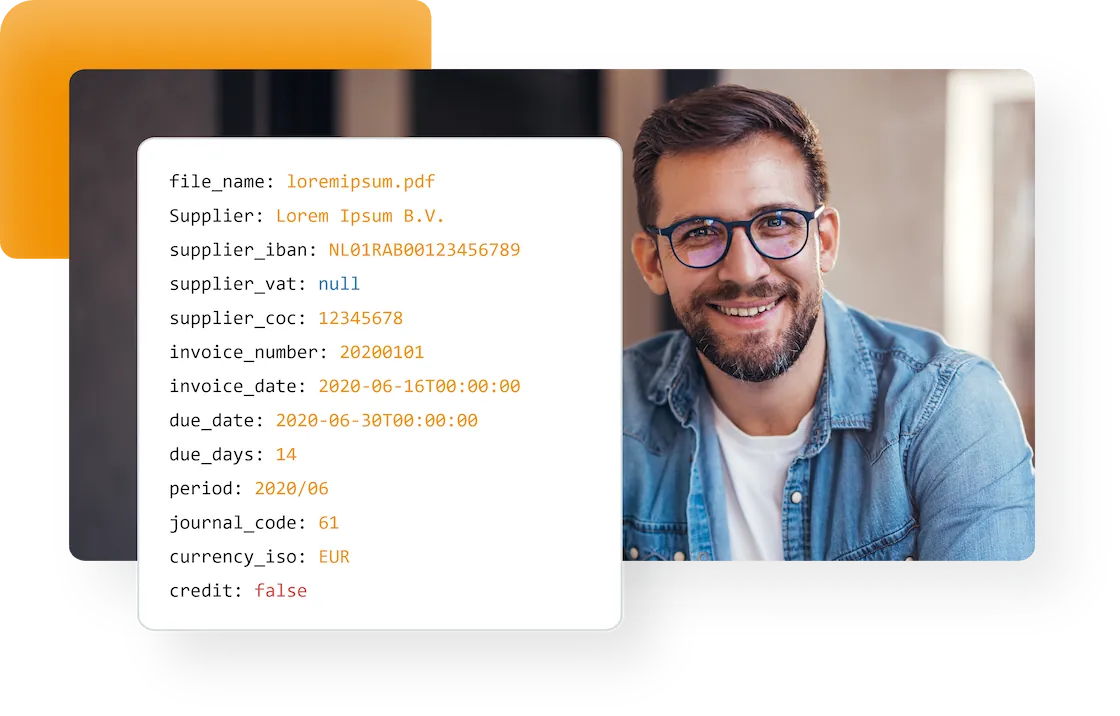
Where does OCR recognition fail?
In invoice processing, OCR recognition has one job: to get the data off the document so nobody has to retype it. The better that works, the less manual work remains, which is why it pays to know where recognition breaks down. In short: paper carries the largest risk, a digital PDF a far smaller one, and with a structured e-invoice the recognition risk disappears entirely. What remains in all three cases is the risk in the layer after it. These are the known weak spots:
| Where it goes wrong | Why |
| Faded till receipts | Thermal paper loses contrast, and without contrast there are no characters |
| Handwriting | The variation in shape is too great for classic character recognition |
| Tables without ruled lines | Segmentation cannot tell where a column ends |
| Stamps and initials over text | Overlapping pixels make characters unreadable |
| Assigning meaning | OCR returns text, not an answer to which number is the total |
The first four rows all arise from images, and there is a clear gradation within them. Paper, a scan or a photo carries the full risk, because everything depends on contrast and sharpness. A PDF generated directly by an accounting or invoicing package already contains the characters as text, so there is little to recognise and correspondingly little to get wrong. Watch the difference, because a scanned PDF is an image rather than text and falls squarely into the first category. With a structured e-invoice such as UBL, the recognition risk disappears altogether, because the fields arrive named.
That leaves the last row, and it applies in all three cases. Even a UBL invoice does not say which ledger account the costs belong to or which VAT code applies. Reading can therefore be removed by changing how documents arrive; interpreting cannot. That takes a second layer, which this article comes back to further down.
Invoice capture, data extraction and OCR: what is what?
Vendors use these labels interchangeably, which makes quotes hard to compare. The difference lies in how much of the chain is covered:
| Term | What it covers |
| OCR | Turning characters in an image into text, with positions and confidence scores |
| Invoice data extraction | Pulling named values out of that text: supplier, date, amounts, VAT |
| Invoice capture software | Everything from intake through extraction, usually including an approval route |
| Invoice OCR software | Used loosely for all of the above; ask which parts are actually included |
The practical test is simple. Ask whether the product hands you searchable text or a coded booking proposal. Those are two very different products at two very different prices.
How does OCR invoice processing work?
Within the wider invoice process, OCR fills a single role: removing the data entry step. Without it, somebody has to retype every invoice before anything can happen with the data. With OCR the data is there immediately, so the rest of the chain can run: matching against a purchase order, an approval route, and eventually payment.
That makes OCR invoice processing not a goal but a precondition. The gain sits not in the reading itself but in everything that becomes possible afterwards without waiting. An invoice arriving on Monday can be awaiting approval on Monday rather than after the weekly entry round.
Scanning invoices with OCR: the process
For business documents, the path from arrival to booking runs in six steps. Note where the line between reading and understanding falls:
| Step | What happens | Layer |
| 1. Delivery | Scan, photo from the app, email attachment or UBL file | Input |
| 2. Reading | Characters are recognised, with position and confidence | OCR |
| 3. Field recognition | Which number is the total, who is the supplier, what is the invoice number | Interpretation |
| 4. Coding | Ledger account and VAT code proposed on the basis of history | Interpretation |
| 5. Review | Checking and completing, for instance with a cost centre | Human |
| 6. Transfer | The approved entry goes to the accounting package | Integration |
Step two is OCR, and nothing more. Everything from step three onwards is a different technique, and that is precisely where vendors let the boundary blur in their marketing.
What does invoice OCR software deliver?
- No retyping. Amounts, dates and invoice numbers come from the document itself.
- Any delivery format. PDF, JPG, PNG, TIFF and paper via a scan or a photo from the app.
- A searchable archive. A scanned receipt becomes findable by supplier and amount rather than by filename.
- Fewer typing errors. Transposed digits in an amount barely occur any more.
- Provenance per value. Because OCR supplies positions, you can point to where on the document an amount came from.
- Works on all business documents. From purchase invoices and receipts to packing slips and expense claims.
Choosing invoice OCR software: what to check
- Does it produce a booking proposal or only text? Plain OCR software gives you a searchable PDF. For a ledger you need field recognition.
- Does it recognise at line level? Header data is enough for a receipt, not for an invoice you want to split across cost centres.
- Does it learn per supplier? Without learning you correct the same thing on every invoice from the same party.
- Can it show where a value came from? During an audit you want to point at the part of the document that produced an amount.
- Does it connect to your accounting package? Without an integration you simply move the retyping to another screen.
- Where are your documents processed? Invoices contain personal data, so ask about processing and retention.
OCR and bookkeeping: what changes?
With invoice OCR software, the work of whoever keeps the books shifts from entering to reviewing. That sounds like a small change but it reshapes the day: instead of a two-hour block of retyping, you assess a queue of proposals of which most are correct. Attention moves to the exceptions.
There is a downside. Reviewing demands a different kind of concentration than entering. Anyone approving a hundred correct proposals in a row becomes less sharp on the hundred and first. Good software therefore sends only the uncertain documents to a human, and that is only possible when confidence scores exist. Where those come from, and why that is not a given, is what the rest of this article is about.
What happens to an OCR invoice after reading?
Everything above concerned the first layer. That second layer, which turns an OCR invoice into a booking, has existed just as long as OCR itself, but it has changed character three times. That is exactly where the confusion about where OCR ends comes from.
- Templates and positional rules. The oldest approach: for each supplier you recorded where on the page the invoice number and the total appeared. That worked precisely as long as the layout stayed the same. If a logo moved or the supplier switched letterhead, the template broke and somebody had to reconfigure it. With hundreds of suppliers, that maintenance became a job in itself.
- Machine learning (AI that learns from examples). Next, systems learned from examples and corrections where fields sit, without a template per supplier. The big advantage: an invoice from an unknown party could be filled in reasonably straight away, because the model recognised patterns invoices have in common. User corrections became the fuel it improved on.
- Language models (AI that understands language). The current step. A language model reads the extracted text in context and understands that “Total incl. VAT” belongs to the amount beside it, even if it has never seen that exact wording. Unusual labels, other languages and other currencies come within reach without having to be defined in advance.
Now notice what happened to OCR over that same period: functionally, almost nothing. The technique inside improved, from fixed pattern matching to neural networks, but what OCR delivers is still what it delivered thirty years ago: characters, with a position and a confidence score. The leap sits entirely in the layer above.
That is where the blurring comes from. Because the second layer became so visibly cleverer, the whole chain is now called “AI”. In practice the AI does the interpreting and OCR still does the reading. Hold that distinction and you immediately see why the question below is a design question rather than a marketing one.
Can you not send the invoice straight to an AI?
This has become the most common question on the subject, and the answer is that technically you can. Modern multimodal AI models accept an image and return structured data. You can upload a photo of an invoice and ask for the amounts without configuring an OCR step anywhere. Most people who try it once are impressed.
The question is not whether it works, but whether you can build on it when the output ends up in your ledger.
Is there OCR underneath an AI model?
Good question, and the answer depends on the build. There are two variants. In the first, a classic OCR step simply runs up front: the text is extracted and handed to the language model as text. OCR is then hidden rather than skipped.
In the second variant the model processes the image directly, without a separate character recognition step. There is then no moment at which individual characters with a confidence score come into existence. The model does effectively the same work, but as part of a single movement and in a different way: it predicts the most likely text instead of classifying characters.
That difference between predicting and classifying sounds academic, but it has one very practical consequence. A classifying system that hesitates returns a low score. A predicting system that hesitates returns a fluent and plausible answer. An amount that looks right but is not on the invoice is then indistinguishable from one that is.
The trade-off: one layer or two
| An AI model alone | OCR plus a trained model | |
| Unusual layouts | Strong, uses context and position together | Strong, provided the model is trained on invoices |
| Provenance of a value | Not demonstrable | Demonstrable on the document |
| Making doubt visible | Barely | A confidence score per field |
| Reproducibility | May differ between runs | Same document, same outcome |
| Invented values | Possible and hard to spot | Very unlikely, the text comes from the scan |
| Cost at volume | Higher per document | Lower, OCR is cheap |
| Setup | Little configuration | More configuration |
For a one-off question about a single document, the direct route wins. For thousands of invoices a month that land in a ledger and still have to hold up in an audit years later, provenance, repeatability and visible doubt weigh heavier than convenience during setup.
Why TriFact365 uses two layers
At TriFact365 the invoice OCR software consists of two layers, and that order is a deliberate choice. The first layer delivers the hard text, anchored to a place on the document and carrying a confidence score. The figures therefore come from the invoice rather than from a model that generates text. The second layer does what OCR cannot: determine which number is the total, which party is the supplier, and which ledger account and VAT code apply, based on how this supplier was booked before and down to line level.
What the customer notices comes down to four things:
- Fewer silent errors. A wrong amount stands out because recognition reports doubt, rather than looking convincing.
- More targeted review. Documents the software is confident about need less attention; the doubtful ones stand out.
- Demonstrable in an audit. The original document sits beside the proposal and you can point to where a value came from.
- Better per supplier. A correction you make today carries through to the next invoice from that same party.
The result is a booking proposal in your own portal, with the document alongside it. After your review and release, the entry goes into your accounting package.
Three persistent misconceptions
- “OCR and invoice recognition are the same thing.” OCR is the first step. Invoice recognition is OCR plus interpretation plus coding. Vendors who supply only OCR are selling you a searchable PDF.
- “With e-invoices you no longer need OCR.” True for the reading: a UBL invoice already delivers the data structured. But which ledger account and VAT code apply is not in there, so the second layer remains necessary.
- “AI has made OCR obsolete.” For a single question about one document, often yes. In a ledger where provenance, repeatability and auditability count, the combination is stronger than either on its own.
Frequently asked questions about invoice OCR software
Invoice OCR software reads invoices automatically using optical character recognition. A second layer then determines which number is the total, who the supplier is and which booking applies.
OCR stands for Optical Character Recognition. It is the technique that recognises characters in an image and converts them into digital text with positions and confidence scores.
OCR reads the text of a document. Invoice recognition goes further and maps that text to fields such as supplier, amount and VAT, and proposes a ledger account. OCR is part of invoice recognition, not the same thing.
Data extraction pulls named values out of the text, such as supplier and amounts. Invoice capture software usually covers the whole path from intake through extraction, often including an approval route.
Technically yes: multimodal models read an image directly. The drawback is that such a model predicts text rather than classifying characters, so a plausible but incorrect amount does not stand out and provenance cannot be demonstrated.
That depends on the build. Some solutions run a classic OCR step first and hand the text to the model, in which case OCR is hidden rather than gone. Others process the image directly, without separate character recognition and confidence scores.
OCR removes the data entry step. The data is available immediately, so matching, approval and payment can run without anyone retyping the invoice first.
Images and scans such as PDF, JPG, PNG and TIFF, plus photos from a mobile app. UBL files do not need OCR at all, because they deliver the data already structured.
Till receipts are printed on thermal paper, which fades. Without contrast between text and background there is nothing to recognise. Photograph the receipt when you get it rather than at month end.
At TriFact365 over 90% of invoices are recognised correctly straight away, thanks to the combination of OCR and self-learning AI. Recognition also improves with every processed invoice from the same supplier.
In closing
Invoice OCR software comes down to one separation: reading is not the same as understanding. OCR supplies the characters, reliably and demonstrably; a trained model turns them into a booking. The temptation to compress those two into a single step is strong, and for a one-off question it works fine. Once thousands of invoices are involved that must still hold up years later, provenance and repeatability are not a luxury.